
Hackathon · 2026
Agent Allowance
A spending account for an AI agent. Rules decide first; your Ledger signs the exceptions.
Try it
Try the allowance here.
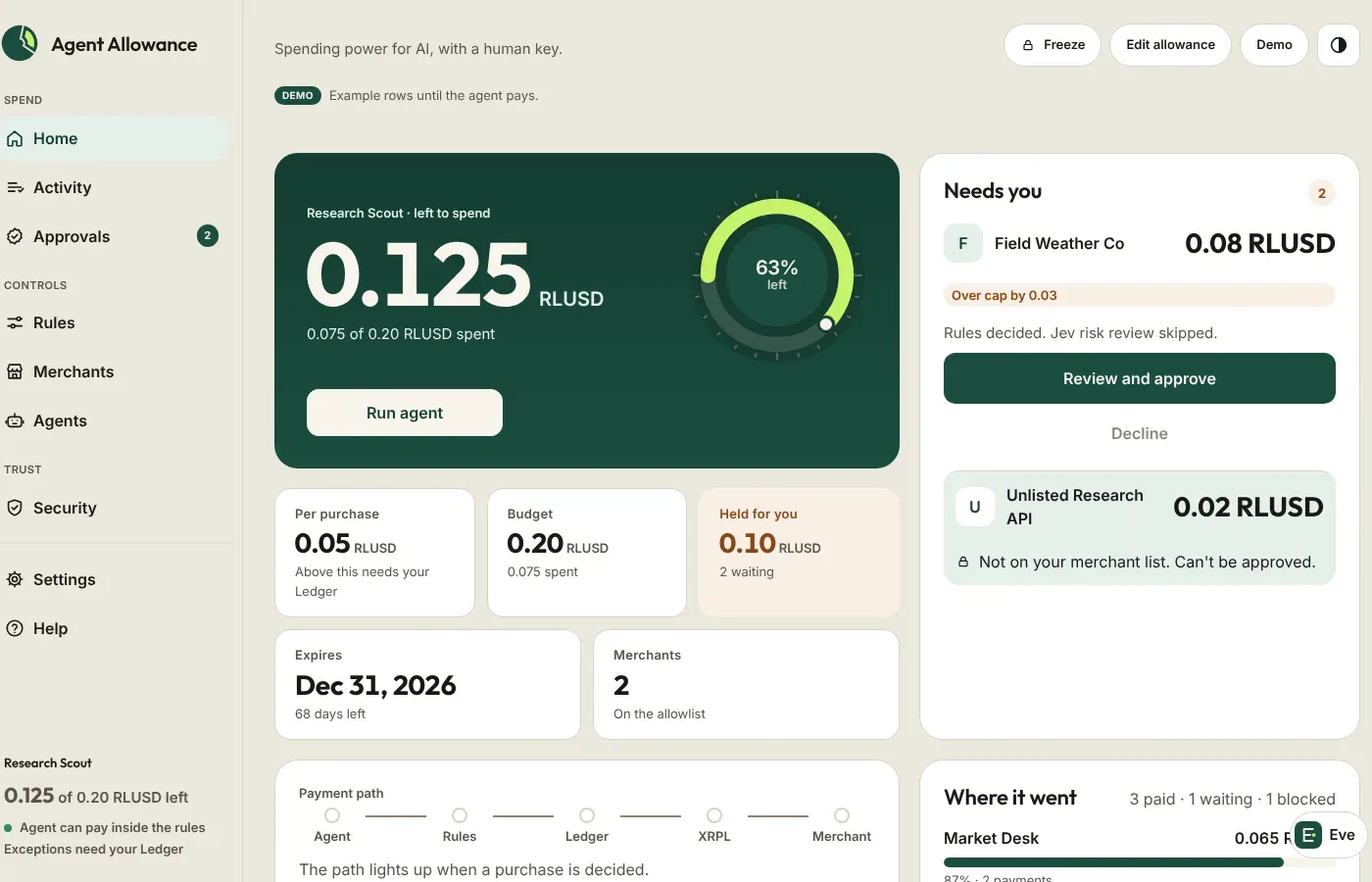
Same dashboard as the hackathon demo. Run agent walks the story with simulated payments; approvals use a labeled simulated Ledger signature. Nothing leaves your browser.
Simulated payments · stays in this browser
Would you give an AI your credit card? Agent Allowance is a spending account for an AI agent. You fund a small budget — 0.20 RLUSD in the demo. The agent pays a merchant on its own only when the quote is from a merchant on your list, at or under a 0.05 RLUSD cap per purchase, before the allowance ends, and still inside the budget. Anything else waits for you, and your Ledger approves it.
Payments are AP4M x402 vouchers settling RLUSD on XRPL EVM Testnet (chain ID 1449000). Built for the Mastercard × XRPL Hackathon, Agentic Finance track.
A playable public demo runs on this site at /agent-allowance/. Approvals use a labeled simulated Ledger signature, and Run agent records simulated payments in your browser — nothing is broadcast. The full source is on GitHub.
What you can do
- See remaining budget as a gauge disk, the five limits as tiles, spend by merchant, and the latest activity.
- Set it up in a minute: name the agent, set the budget and cap, choose merchants, pick an end date, and connect a Ledger as the approver.
- Understand every hold: which rule a purchase hit, how far over the cap it is, and exactly what the Ledger signs.
- Ask Eve anything about the account. She reads; the only actions she can propose are a freeze and a decline, which you confirm.
- Freeze everything at once. Unfreeze is one obvious button away.
How it works
- Rules first.
checkRulesreads the merchant’s HTTP 402 quote and stops at the first failure: expired, merchant not allowed, over the cap, or over the budget. Nothing is signed on a failure. - Jev, second. Optional risk review can hold a quote for a person after the rules allow it. Jev cannot spend past a rule.
- AP4M x402. The agent reuses an open Channel, signs one voucher, and the merchant redeems it on XRPL EVM Testnet.
- Ledger for exceptions. Out-of-rule purchases and allowance raises need EIP-712 signatures (
ApprovePurchase,SetAllowance). Lowering a limit applies without a signature.
Run it
You need Node.js 22.13 or newer. From the repo:
cp .env.example .env
npm start    # API :8787, dashboard :5173
Or deploy the hosted public demo from render.yaml — every visitor gets a private sandbox, and approvals use a clearly labeled simulated Ledger signature.
npm test
npm --prefix dashboard run build